Use Gemini even with geo-restrictions - 在香港使用 Google Gemini
May 22, 2025· ·
1 min read
·
1 min read
Chi Yau
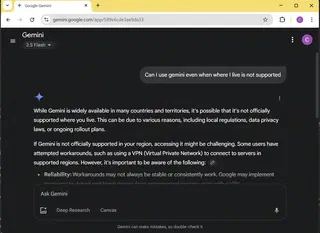 Image credit: sharechiwai
在香港使用 Google Gemini
當你嘗試在香港使用 Google Gemini 時,你可能會看到地區限制的頁面,如下圖所示:

解決方法
如果你是 Google Workspace 的用戶,你可以輕鬆繞過這些限制,並自由g地使用 Google Gemini。
以下是一些步驟,幫助你在地區限制的情況下使用 Google Gemini:
確保你已經擁有 Google Workspace 帳戶。
點擊 Gmail 中的應用程式圖示,選擇「Google Workspace Admin Console」
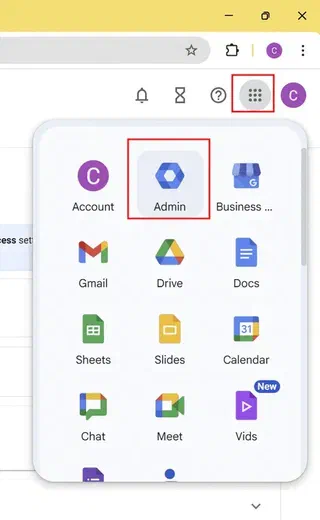
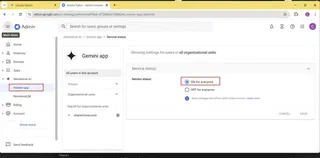
在「Google Workspace Admin Console」 選擇「Generative AI」和「Gemini app」,以啟用 Gemini(如果尚未啟用)。
登錄你的 Google Workspace 帳戶,並嘗試再次訪問 Google Gemini。
這樣,你就可以在香港或其他地區限制的地方使用 Google Gemini 了!

Authors
App Dev
I’m Chi, a passionate tech enthusiast exploring the latest innovations in GenAI, LLMs, web development, performance tuning, and cybersecurity. As a tech guy at a startup, I aim to share my experiences, insights, and lessons learned in the fast-paced world of technology. Join me on this journey as we dive into the exciting challenges and triumphs of building and scaling tech solutions!